The waveshock plugin pack
Plugin Shop
by ARDO & WAVESHOCK
Four plugins for your DAW: a volume curve that pumps in time, the effects of a club DJ mixer, a key detector and a synth that hunts for the sound of your sample.

Plugins
Four plugins, one style
Effect
Shockchain
by ARDO & WAVESHOCK
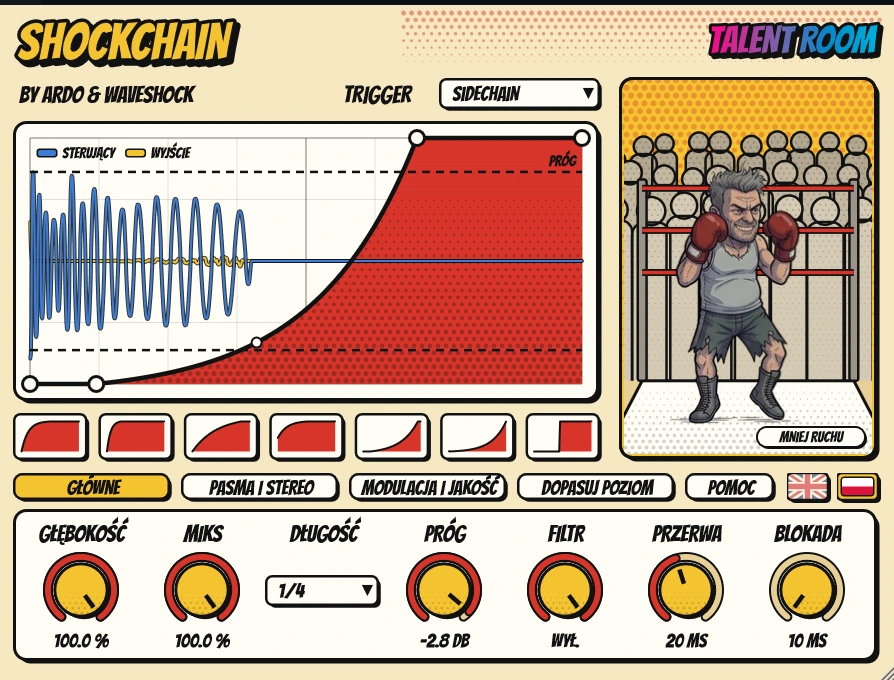
You draw a volume curve and it pumps to the beat, to MIDI notes or to a sidechain. It is not a compressor: the curve multiplies the signal, and a boxer in the ring throws a punch on every hit.
Top 10 features
- 5 trigger modes: Beat Sync, MIDI, Sidechain, Auto Detect and Ducker
- Curve editor: drag points and bend segments, up to 32 points
- 7 factory curves: Classic, Tight, Smooth, Soft, Long Pump, Swell, Gate
- Beat Sync locked to the song grid: 1/4, 1/8, 1/16, dotted and triplet
- The kick under the curve and the output on the same cycle
- LEVEL MATCH: matches the bass level to the kick in 4 bars
- Two-band split (24 dB/oct) with its own depth and mix per band
- A separate curve for the high band: LINK / LOW / HIGH
- Width: the kick lands in mono on every hit
- 2x / 4x oversampling for very fast gates
All featuresHide the list
Triggering
- Beat Sync: the curve loops on the DAW grid, locked to the song position; with no transport (Standalone) it runs at 120 BPM
- MIDI: every note plays the curve once, Velocity sets how hard
- Sidechain: every hit above the threshold plays the curve
- Auto Detect: like Sidechain, but listens to its own input
- Ducker: classic ducking with Attack, Hold and Release
- Detector: threshold, low-pass (e.g. 150 Hz for the kick only), Hold and Lockout
Curve editor
- Drag points in both directions, bend segments
- Double-click to add a point (up to 32), double-click or right-click to remove one
- Straighten a segment; the curve wraps around the cycle edge
- 7 factory curves as thumbnails under the display
- The curve is saved with the project
Display
- The key signal as a waveform with threshold lines
- The output on the same cycle, e.g. to check sub phase against the kick
Level match
- MATCH listens for 4 bars and sets Trim so the bass is as loud as the kick
- Offset moves the bass relative to that level, e.g. -3 dB
Bands and stereo
- Split divides the audio into low and high (Linkwitz-Riley 24 dB/oct)
- Its own Depth and Mix per band
- LINK / LOW / HIGH: a separate curve for the high band
- Width ducks the side signal on every hit
Modulation and quality
- Repeats: the curve 2–8 times per cycle
- LFO: depth, rate and shape, synced to the song
- Quality: oversampling Off / 2x / 4x, latency reported to the DAW
Interface
- The boxer dances, punches and throws combos with POW! / BAM! / WHAM!
- REDUCE MOTION switch
- Tooltips and help in English and Polish
- VST3 and Standalone on Windows, macOS soon
Effect
RAVE MIXER
by ARDO & WAVESHOCK
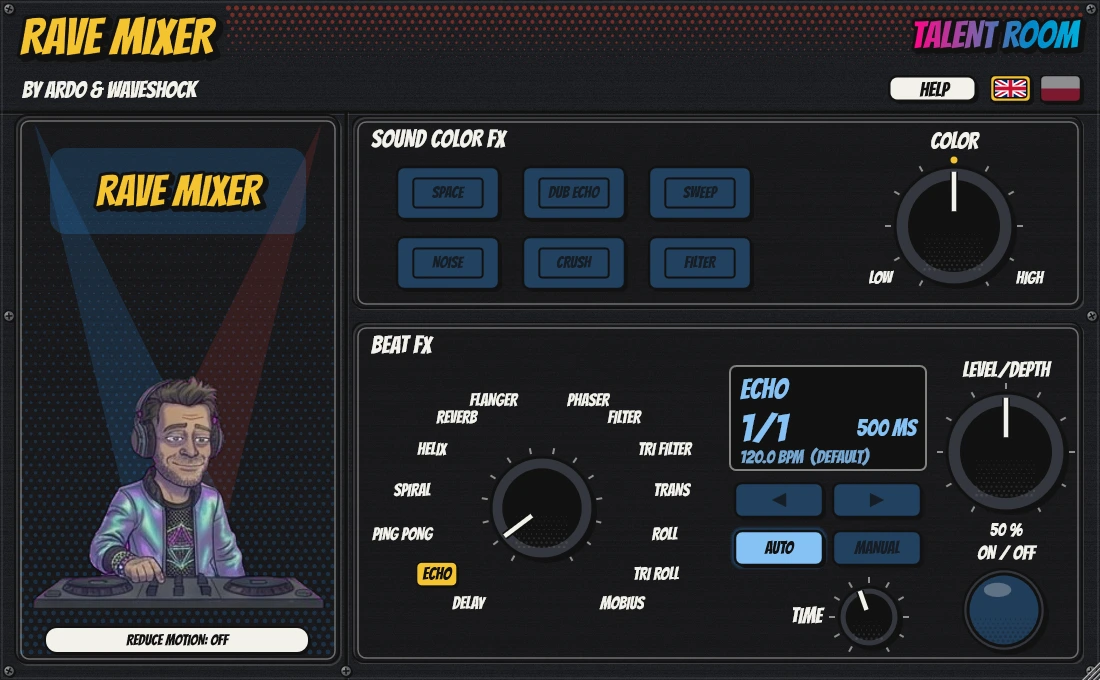
The effect sections of a club DJ mixer in your DAW: 14 Beat FX and 6 Sound Color FX with a single COLOR knob. Behind the console a DJ dances and twists the knobs with you.
Top 10 features
- 14 Beat FX: Delay, Echo, Ping Pong, Spiral, Helix, Reverb, Flanger, Phaser, Filter, Triplet Filter, Trans, Roll, Triplet Roll, Mobius
- 6 Sound Color FX: Space, Dub Echo, Sweep, Noise, Crush, Filter
- One COLOR knob: the centre is no effect, left and right give a different character
- Tempo from the DAW (AUTO) or time in milliseconds (MANUAL)
- Beat divisions from 1/16 to 16/1 with the < > buttons
- TIME from 1 ms to 32 s, smooth and fully automatable
- LCD with the effect name, BPM and time
- Echo and reverb tails ring out after you switch off
- Switching on and changing effects without clicks
- The DJ behind the console dances to the beat and goes wild when you twist the knobs
All featuresHide the list
Beat FX
- Delay: a single repeat, no feedback
- Echo and Ping Pong: repeats with a filter in the loop, Ping Pong alternating left / right
- Spiral: an echo that blurs into reverb
- Helix: at maximum it freezes the loop, no new sound gets in
- Reverb: TIME is the room size, from small to huge
- Flanger and Phaser: sweeps synced to the beat grid
- Filter and Triplet Filter: a resonant filter in time
- Trans: a rhythmic gate
- Roll and Triplet Roll: records and repeats a slice
- Mobius: an endlessly rising tone modulating the sound
Sound Color FX
- Filter: low-pass to the left, high-pass to the right
- Space: room that grows with COLOR
- Dub Echo: a 3/4-beat echo with a filter in the loop
- Sweep, Noise and Crush
- The effect fades in smoothly from the centre, no jump
Controls
- LEVEL/DEPTH works like on a mixer
- The ON button blinks in time while the effect runs
- No tempo from the DAW: 120 BPM, and the LCD shows DEFAULT
- Click an effect name on the selector to pick it
Sound
- Interpolated delay lines and protection against clipping
- Changing the delay time behaves like tape
Interface
- A dark housing like a club mixer, window scaling from 0.75x to 2x
- Help with setup for FL Studio, Ableton Live, Cubase, Studio One, REAPER and Bitwig
- REDUCE MOTION switch
- English and Polish
- VST3 and Standalone on Windows, macOS soon
Tool
WHAT THE KEY?
by ARDO & WAVESHOCK
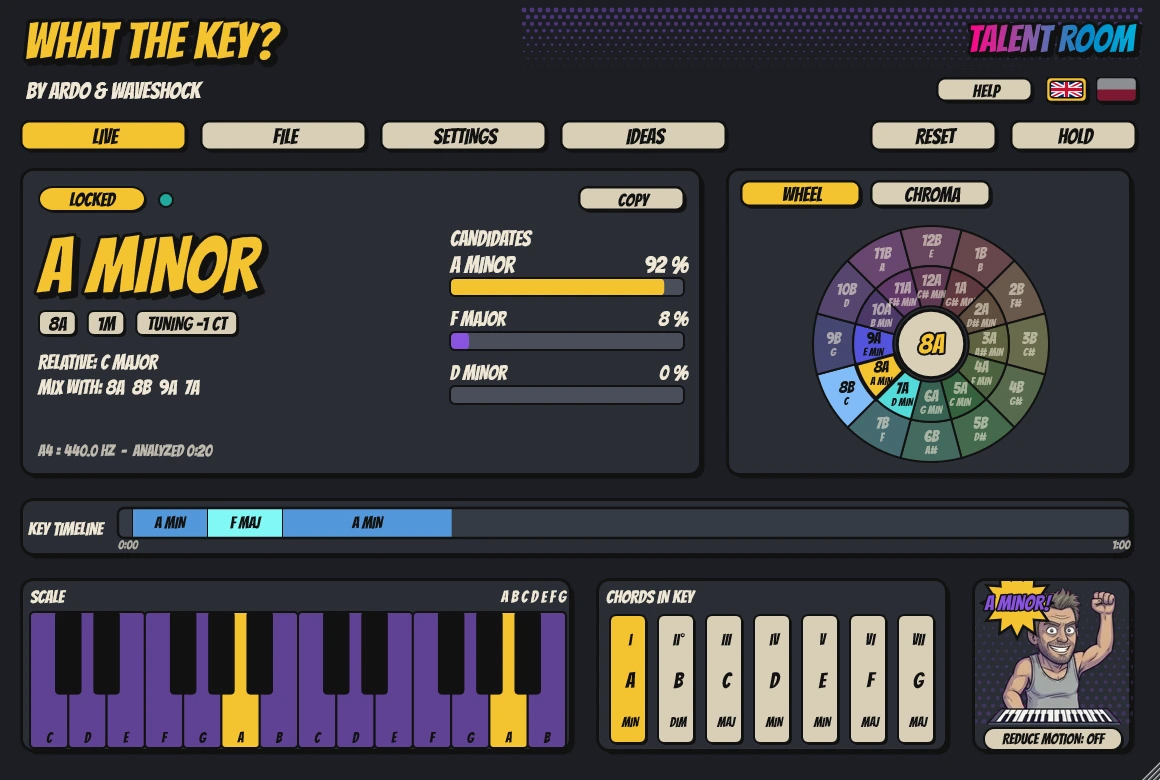
Detects the key of your audio live or from a dropped file, and suggests what fits with it. The sound passes through the plugin untouched.
Top 10 features
- LIVE: the key of the audio playing through, first result in 1–2 s
- FILE: drop a WAV, MP3, FLAC, AIFF or OGG and get a full analysis
- Up to 3 key candidates with confidence bars
- Camelot and Open Key codes next to the key name
- A Camelot wheel with keys that mix well
- Tuning detection and manual A4 from 415 to 466 Hz
- A timeline of key changes in the track
- Chromagram, a keyboard with the scale and the chords of the key
- IDEAS: progressions, bass and melody as MIDI to drag out
- The signal passes bit-exact, unchanged
All featuresHide the list
Analysis
- ANALYZING, then LOCKED once the result is confident and stable
- Long tracks: the result keeps refining in the background
- RESET and HOLD (freezes the result)
- The relative key and keys that mix well
Visuals
- A big key result with Camelot and Open Key codes
- A 12-note chromagram with the scale highlighted
- A key timeline
- Camelot wheel: a click highlights compatible keys
- A keyboard with the scale lit and the diatonic chords
Settings
- Notation: note names, Camelot or Open Key; sharps or flats
- A4 tuning from 415 to 466 Hz
- Speed / accuracy slider
- Modal scales: Dorian, Phrygian, Lydian, Mixolydian, Aeolian (off by default)
Ideas
- Numbered chord progressions from the detected key
- Bass and melody to drag out as MIDI
- Simple chord editing and preview only while PLAY is on
Interface
- A keyboard player who nods, plays and celebrates the result
- REDUCE MOTION switch
- Help for FL Studio, Ableton Live, Cubase, Studio One, REAPER and Bitwig
- English and Polish
- VST3 and Standalone on Windows, macOS soon
Instrument
CASINO SYNTH
by ARDO & WAVESHOCK
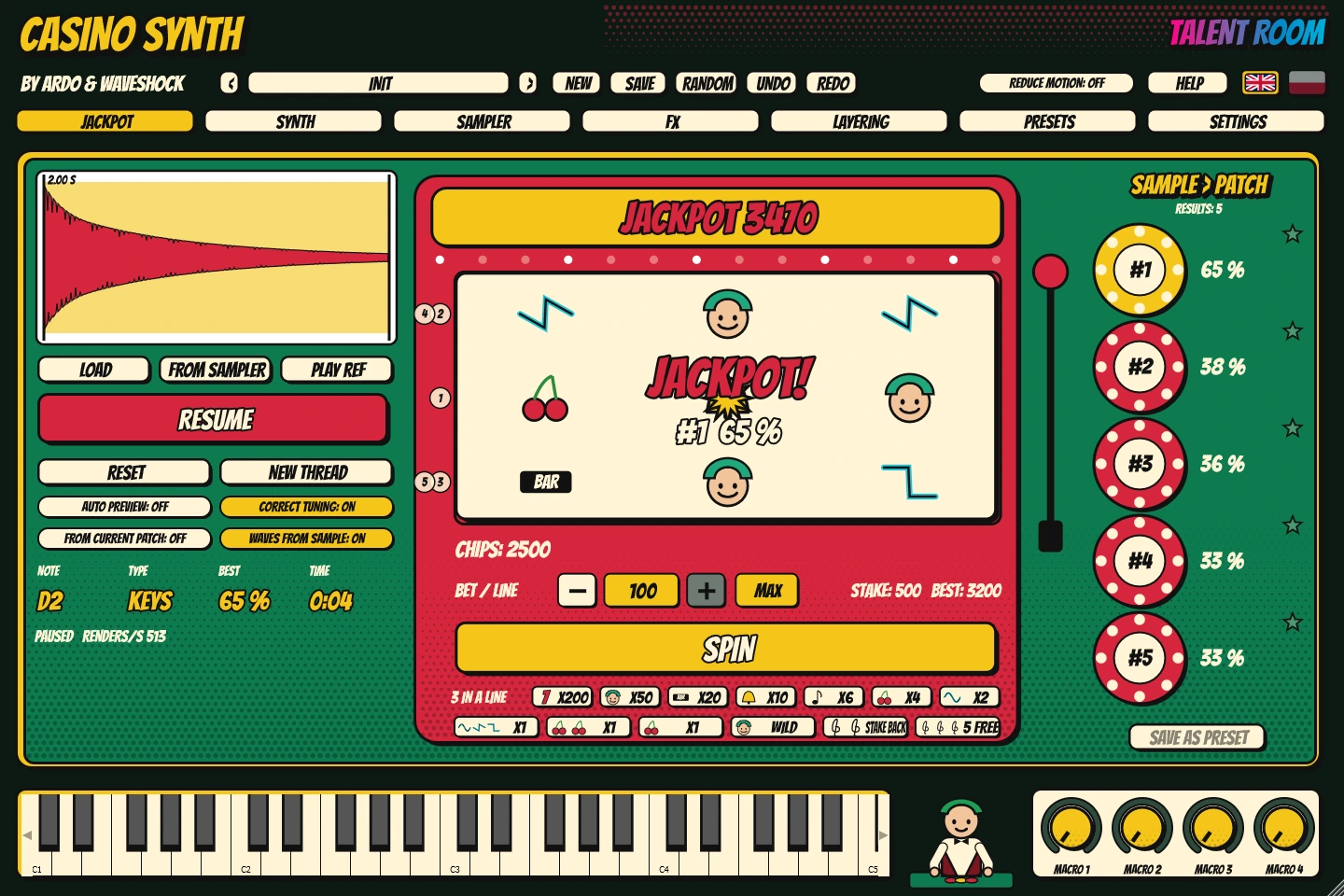
Drop in a sample and JACKPOT searches for synth settings that sound like it, giving you several different results to choose from. Everything runs on your computer, no internet.
Top 10 features
- JACKPOT: matches the synth sound to your sample
- 4 to 16 clearly different results with a similarity %
- Runs locally on your CPU, no internet
- Waves from the sample: a wavetable cut from your own sound
- Two wavetable oscillators with up to 16 unison voices
- SAMPLE oscillator: at the root note it plays the sample bit-exact
- Two filters: LP, HP, BP, notch, ladder, comb and formant
- A 16-slot modulation matrix, 3 envelopes, 4 LFOs and 4 macros
- Effects: distortion, chorus, phaser, delay, reverb and EQ
- A one-armed bandit to play while JACKPOT searches (no real money)
All featuresHide the list
JACKPOT
- Drop a sample or open a file, pick a slice up to 4 s
- START, PAUSE and RESET; results appear live as chips
- Click a chip to hear it and load it into the synth; the star pins a result
- AUTO PREVIEW, reference playback and tuning correction
- Search starting from the current patch
- Save a result as a preset
Oscillators
- OSC A and OSC B wavetable, up to 256 frames, alias-free
- WARP modes: sync, bend, PWM, mirror, quantize, FM, AM, RM
- Up to 16 unison voices with detune, blend and stereo width
- SUB and NOISE
- Wavetable import from WAV and wavetables made from a sample
Filters and modulation
- FILTER 1 and 2 in series, parallel or mixed
- ENV 1–3 with curves and looping, LFO 1–4 with tempo sync
- A 16-slot modulation matrix and 4 macros
Sampler
- WAV, MP3, FLAC, AIFF and OGG, drag and drop or an open button
- Automatic root note detection and manual correction
- Start, end, loop with crossfade, reverse, ONE-SHOT or GATE
Voices and effects
- Up to 32 voices, MONO and LEGATO, glide up to 10 s
- DISTORTION, CHORUS, PHASER, DELAY, REVERB, EQ and OUTPUT
Presets and interface
- Categories BASS, LEAD, PAD, PLUCK, KEYS, FX and JACKPOT
- Undo / redo, copy and paste a patch
- Casino colours, REDUCE MOTION switch, English and Polish
- VST3 and Standalone on Windows, macOS soon
How to install
Get the plugin files
You get the VST3 file and the Standalone app for Windows.
Copy the VST3
The plugin goes into the system VST3 folder (one permission prompt).
Rescan plugins in your DAW
FL Studio, Ableton Live, Cubase, Studio One, REAPER, Bitwig. The HELP tab of every plugin has steps for your DAW.
FAQ
Which system do the plugins run on?
Windows for now: VST3 and a Standalone app. macOS versions (VST3 and AU) are the next step.
Which DAWs can I use?
Any DAW that loads VST3. The plugin help covers FL Studio, Ableton Live, Cubase, Studio One, REAPER and Bitwig.
Are the plugins in English?
Yes. Each one has a flag switch: English and Polish, including tooltips and help.
Can I turn the animations off?
Yes. Every plugin has a REDUCE MOTION switch. On this page, use the “Animation” button in the menu.
How do I buy or get access?
The shop is being prepared. Write to us and we will let you know when the plugin is available.